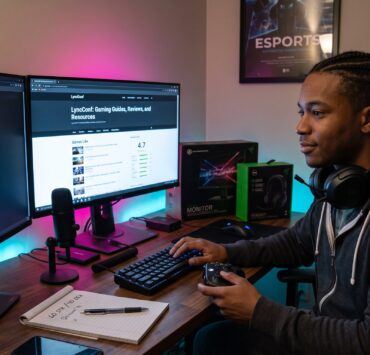

How to Browse LyncConf Game Reviews is a short practical primer that shows where to find thorough, timely opinions on lyncconf.com and how to use them. Readers who want to avoid buyer’s remorse will learn which sections to check, which signals mark a useful review, and quick navigation tricks that save time. The guide focuses on concrete steps, search terms, filters, and credibility checks, so readers can decide fast whether a game matches their platform, playstyle, and available time.
Key Takeaways
- Browsing LyncConf game reviews helps you avoid buying games that don’t fit your platform, playstyle, or available time.
- Use precise search queries and filters like genre, platform, and playtime to quickly locate relevant LyncConf reviews.
- Check for review credibility by verifying testing dates, platforms, and specific performance details to ensure accurate information.
- Prefer reviews that explain their conclusions clearly, including author playtime and configuration for better decision-making.
- Use combined review signals—platform, mood, mechanics, and playtime—to find games that truly match your preferences.
- Bookmark favorite genre pages and search results on LyncConf for faster future browsing and easier game discovery.
Why Read LyncConf Game Reviews Before You Play
Fact first: reading LyncConf game reviews reduces the chance of picking a game that wastes money or time. A concise LyncConf review often lists gameplay systems, graphic expectations, story length, replayability scores, and platform quirks, all details a player needs before purchase. For example, a review might note a 12–18 hour campaign with poor Switch performance: that single line prevents a costly download for a commuter who only plays handheld.
Why this matters: retail storefront blurbs and trailers emphasize spectacle, not session length or control feel. LyncConf reviews break down mechanics (combat rhythm, progression), identify whether a title favors short sessions or long campaigns, and offer a verdict targeted to types of players. That makes reviews valuable for time-limited players, those on specific platforms, or anyone seeking a particular mood, cozy, tense, or competitive.
Where To Find Reviews On LyncConf
Answer up front: reviews live in several predictable spots on LyncConf: the Games hub, Reviews section, and curated “Games Like” lists. Start at main navigation under Games or Reviews and then refine. Many editorial picks also appear inside roundups like “Best X” or platform lists.
Practical route: use category pages for genres and the site’s archive to see grouped reviews by year and platform. For deeper context, mod support or community projects, consult related pages like the game mods overview. To understand the broader resources LyncConf offers for gamers, visit the site’s resource hub via a short guide to gaming guides and resources.
Navigation tip: bookmark genre pages and the site search results for your favorite tags so future browsing takes two clicks instead of ten.
Using Site Search, Filters, And Categories Effectively
Direct answer: use precise search queries and combine tags for the fastest results. Type queries like “games like Hollow Knight”, “roguelike co‑op Switch”, or “short narrative PC” into the search bar to retrieve relevant reviews quickly.
Concrete tactics: filter by genre, platform, and year when possible. If looking for short sessions, add terms like “short sessions” or “under 10 hours.” Use category pages for curated lists, they gather similar reviews and help compare titles side-by-side. If a review mentions mods, follow the internal link to the mods collection for practical modding guides and examples.
Example: searching “co‑op survival Switch” returns platform notes, performance caveats, and multiplayer scale, all in one result rather than spread across multiple articles.
How To Evaluate Review Credibility
Key fact: credible reviews state clear criteria and include date and platform context. A trustworthy LyncConf review will say what was tested (PC, PS5, Switch), when testing happened, and which build or patch was used. That prevents confusion when performance or features change after patches.
Red flags: vague praise without examples, no date, or generic “must play” claims that lack system details. Cross-check the review date against recent patch notes or community threads for major changes. For hands-on setup and performance checks, the site also hosts optimization guides such as the PC optimization hub, which pairs well with technical review sections.
Practical check: if a review names specific mechanics, cites issues with frame rates, or compares a game to named similar titles, it likely has the depth needed to make an informed buy decision.
Checking Author Credibility And Review Depth
Straight answer: prefer reviews where the author explains why conclusions were reached. Good authors list playtime, configurations, and the types of players they recommend the game to.
What to look for: an author bio that mentions genre familiarity or platform expertise, explicit playtime (e.g., “24 hours in story mode”), and examples of strengths and weaknesses. If an author states they played a title only in co‑op or used a controller on PC, that context matters. For community and competitive angles, see pieces on community and competitive play.

Honest moments: a credible reviewer will admit mistakes, for example, noting they missed a patch that fixed an issue, or that a personal preference (e.g., disliking roguelikes) colored their score. Those admissions increase trust.
What To Look For In A Helpful Review
Clear answer: a helpful review gives specifics on mechanics, mood, playtime, and platform performance. Look for these exact elements:
- Genre and core mechanics: does it explain systems (deck‑building, survival loop)?
- Tone and intended audience: does it say “cozy puzzle for short sessions” or “hardcore, lengthy RPG”?
- Playtime and replayability: specific hours or modes (e.g., “main story ~15 hours: NG+ available”).
- Platform notes: any performance quirks on Switch, frame drops, control mapping, or save issues.
Example detail: instead of “great combat,” a useful review will write “combat favors dodge‑timing over shield play, with a 0.3s input window that punishes slow controllers.” That level of specificity signals practical value.
Tips For Using Reviews To Choose Games That Fit You
Direct tip: match review signals to the player’s constraints in this order, platform → mood → mechanics → playtime. Start with platform compatibility, then confirm the review’s mood tag (cozy, tense), evaluate whether core systems match play habits, and finish by checking playtime.
How to shortlist: use “Games Like” lists to compile 4–6 candidates, then cross‑check release and patch dates for recency. For locating guides and broader context while shortlisting, use the quick primer on what gamers find on LyncConf. Next, filter by playtime if evenings allow only 30–60 minute sessions.
Practical warning: a glowing review from 2019 may miss a 2024 DLC that changes balance. Always confirm the review date. Final honest note: even the best review can’t predict personal taste, use reviews to narrow choices, then try demos, trailers, or short refunds where available.
Closing takeaway: combining curated lists, filters, and credibility checks makes selecting a game on LyncConf fast and much more reliable.