

You have a 15ms ping, your monitor runs at a blistering 240Hz, and your crosshair was pinned directly to the opponent’s forehead, yet your bullet vanished into thin air and you collapsed two paces behind concrete cover. Every competitive player in Counter-Strike 2, Valorant, and Escape from Tarkov knows the visceral frustration of “floaty,” inconsistent mouse aim. When mechanical muscle memory suddenly feels sluggish and hit registration turns into a dice roll despite pristine scoreboard metrics, the culprit is rarely simple ping spikes. Instead, it stems from a compounding breakdown across hardware polling cycles, GPU render queues, and client-server interpolation buffers—and while hardware optimization is legal, the line blurs with automation; distinguishing legitimate peripheral tuning from unauthorized solutions like Tarkov hacks remains a key challenge for both players and tournament organizers.
Key Takeaway: Low network ping does not guarantee crisp hit registration. “Spongy” or inconsistent aim is primarily driven by GPU frame-queue saturation, USB polling jitter, and temporal discrepancies between client rendering ticks and server-side interpolation backtrack. Resolving it requires diagnosing the physical input chain before touching network configurations.
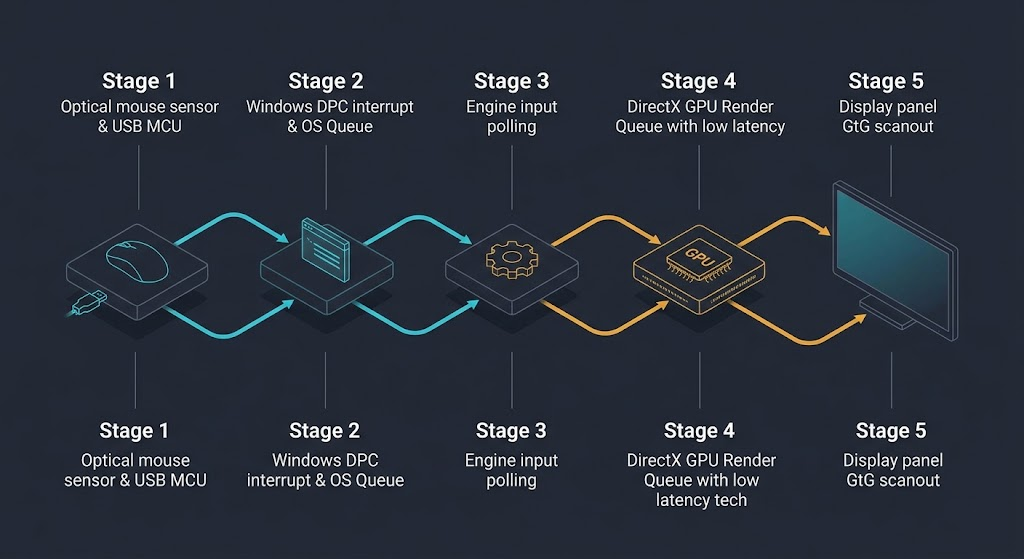
The Physical Input Pipeline: Where Milliseconds Vanish Locally
Before a shot packet ever traverses an optical fiber line to a game server, your input must navigate a congested local hardware stack. The latency chain begins at the optical sensor of your mouse and ends only when the display illuminates the resulting muzzle flash. If any stage in this pipeline stalls, your hand-to-eye coordination registers the delay as “heavy” or “detached” aiming.
The input pipeline consists of five distinct local stages:
- Sensor Framing & MCU Processing: The mouse sensor captures surface images (often at 10,000+ FPS), converts them into coordinate deltas, and batches them into USB report packets via the onboard microcontroller (MCU).
- OS Event Queue & DPC Latency: Windows processes the USB interrupt. If Deferred Procedure Calls (DPCs) or rogue background drivers interrupt the CPU, input packets experience micro-jitter before reaching the game engine.
- Engine Input Polling: The game thread polls raw input APIs (Raw Input / DirectInput) to calculate camera view-angle modifications for the upcoming frame.
- Render Pipeline & GPU Buffering: If your graphics card operates at 99% or 100% capacity without low-latency mitigations, the DirectX or Vulkan render queue stacks up to two pre-rendered frames in VRAM, introducing 15–30ms of pure hardware lag.
- Display Scanout & Pixel Response: The GPU scanout buffer pushes the frame over DisplayPort to the panel’s scalar, where pixel transition times (GtG) determine visual immediacy.
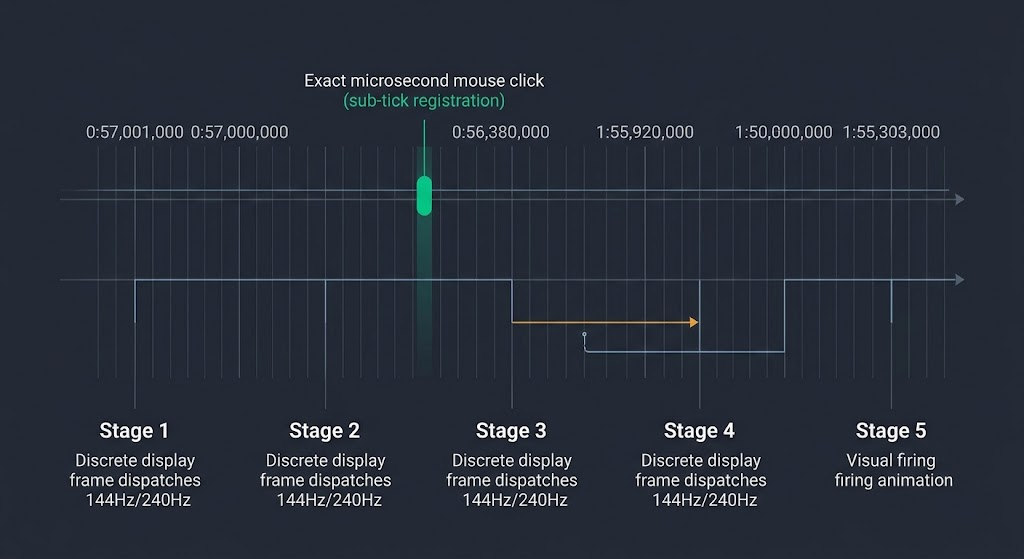
Tick Rate vs. Sub-Tick: The Illusion of Synchronization
The transition from traditional discrete tick rates (such as Valve’s legacy 64-tick and 128-tick architectures) to continuous timestamping systems like Counter-Strike 2‘s sub-tick engine introduced a subtle psychological friction. Traditional 128-tick servers processed all player positions, shots, and physics interactions in discrete, synchronized 7.8ms time slices. Your visual output and shot calculation were locked to the exact same temporal boundary.
Sub-tick architecture functions differently: the engine records mouse button presses and view angles at the exact microsecond they occur between server ticks. However, the game cannot render the resulting bullet tracer or target reaction until the subsequent frame arrives. This creates an uncoupling between action calculation and visual validation. You may click precisely on an enemy crossing your screen, but because your client renders the consequence frames later on the next tick interval, the shooting animation feels fundamentally disconnected from the physical click.
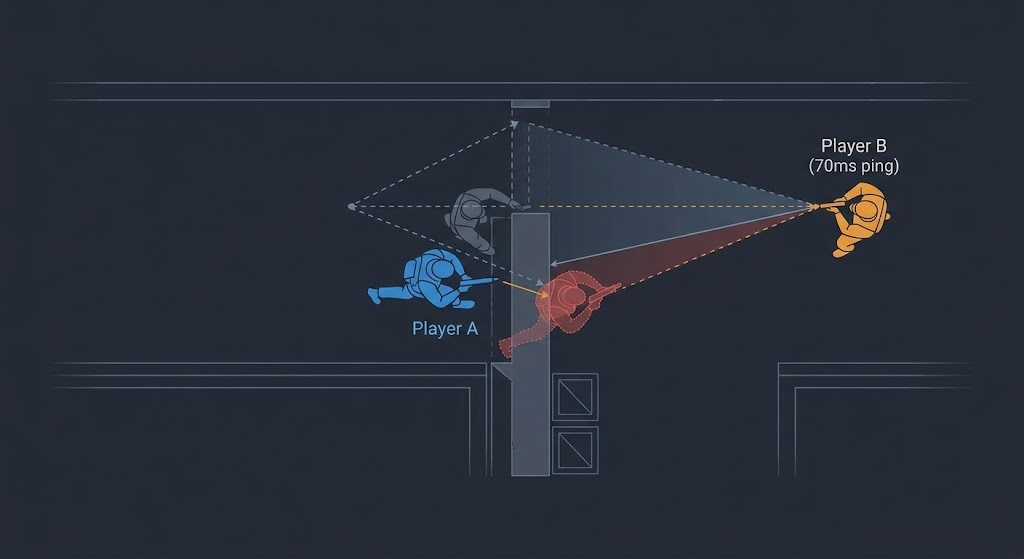
Lag Compensation and the “Dying Behind Walls” Paradox
Nothing induces tilt quite like taking cover behind solid brick, only to drop dead half a second later. This phenomenon is an inevitable byproduct of server-side lag compensation (backtracking) and client interpolation (interp).
Because network latency prevents every client from seeing an identical game state simultaneously, game engines store a historical buffer of player hitboxes (often up to 200–400 milliseconds). When an opponent with 70ms ping fires at your character model, the server does not check where you are now; it rewinds the game world to where your hitbox existed on the shooter’s screen at the moment they clicked. If you dashed behind cover during that 70ms transit window, the server accepts the shooter’s retroactively calculated hit and relays your death backward across the wire.
Diagnostic Matrix: Identifying the Source of Input Friction
|
Symptom |
Primary Root Cause |
Verification Metric |
Targeted Correction |
|
Spongy, sluggish aim during heavy gunfights |
GPU queue saturation (100% core load) |
Frame-time spikes / High PCL (PC Latency) |
Enable NVIDIA Reflex / AMD Anti-Lag; cap FPS slightly below maximum stable output. |
|
Erratic cursor micro-stutter at high polling rates |
DPC interrupt latency / CPU Core 0 bottlenecks |
LatencyMon execution time spikes > 1000µs |
Move mouse to a direct motherboard USB port (avoid external hubs); disable C-states in BIOS. |
|
Ghost shots passing through moving models |
Interpolation buffer packet starvation |
In-engine packet jitter / Telemetry choke |
Adjust network smoothing buffers to tolerate 1–2 packets of jitter; avoid aggressive minimal interp on lossy Wi-Fi. |
|
Severe peeker’s advantage / dying behind walls |
High opponent ping + server backtrack window |
Ping differential > 50ms |
Avoid passive, stationary holding angles; use dynamic pre-aiming and jiggle-peeking to abuse the rewind buffer. |

System Optimization Protocol: Eliminating Pipeline Latency
Systematically stripping latency out of your competitive setup requires addressing the physical input chain, the operating system kernel, and the network transport layer in strict sequence:
Frequently Asked Questions
Does higher FPS always reduce input lag, even on a lower refresh rate monitor?
Yes. Higher framerates shorten the time between game logic updates and the capture of fresh input data. Even if your 144Hz monitor cannot display every frame generated by a 400 FPS engine, the frame it does display contains significantly more recent input data than one generated at 144 FPS.
Why does my aim feel crisp in offline practice but muddy on live servers?
In offline practice bots, the server runs locally on your loopback adapter (0ms latency), completely bypassing interpolation buffering, server tick serialization, and packet queuing. On public servers, interpolation algorithms artificially buffer incoming state updates to smooth out network jitter, altering the physical timing of target rendering.
Can a high mouse polling rate degrade in-game framerates?
Yes. At 4000Hz or 8000Hz polling rates, the operating system processes thousands of hardware interrupts every second. On systems with older CPUs or unoptimized background processes, this deluge saturates the main thread responsible for engine frame dispatching, causing micro-stutter and frame drops.